• HOME
  • WHAT WE DO
    • Flat Rate Managed IT Services and Support
    • Cloud Solutions
    • Technology Consulting
    • Hardware and Software
    • Phone Systems
  • ABOUT
    • Why Singlesource IT?
    • News
    • Technology Partners
  • CONTACT US
  • Search

Mobile Menu

Call us today!

(614) 784-9738

  • Menu
  • Skip to right header navigation
  • Skip to main content
  • Skip to primary sidebar
  • Skip to footer

Before Header

Call us today:  (614)784-9738

Client Login

Free Risk Report

Protected Documents

Download Your Cyber Security Guide

Singlesource IT

Your Central Ohio IT Provider. Specializing in small and mid-sized business.

  • HOME
  • WHAT WE DO
    • Flat Rate Managed IT Services and Support
    • Cloud Solutions
    • Technology Consulting
    • Hardware and Software
    • Phone Systems
  • ABOUT
    • Why Singlesource IT?
    • News
    • Technology Partners
  • CONTACT US
  • Search

Don’t Trust Airport USB Chargers or Wi-Fi! New Official Warning from the TSA

With the busy summer travel season underway, the Transportation Security Administration (TSA) is warning globetrotters about the dangers of using USB chargers at airports. According to a Facebook post from TSA, travelers should avoid charging electronic devices via the USB ports that are now commonplace at airports around the country and the world because of the potential malware the ports may contain.

According to TSA’s advisory on Facebook: “Hackers can install malware at USB ports.” The advisory goes to state that “when you’re at an airport do not plug your phone directly into a USB port. Bring your TSA-compliant power brick or battery pack and plug in there.”
The same Facebook advisory also contains a warning from the government agency about free public WiFi available at most airports. Here too, the concern is that hackers can access your personal information unbeknownst to you, the traveler. The TSA Facebook post states: “Don’t use free public WiFi, especially if you’re planning to make any online purchases.”  The post goes on to warn “Do not ever enter any sensitive info while using unsecure WiFi.” Meanwhile, privacy experts have been busy issuing warnings of their own.

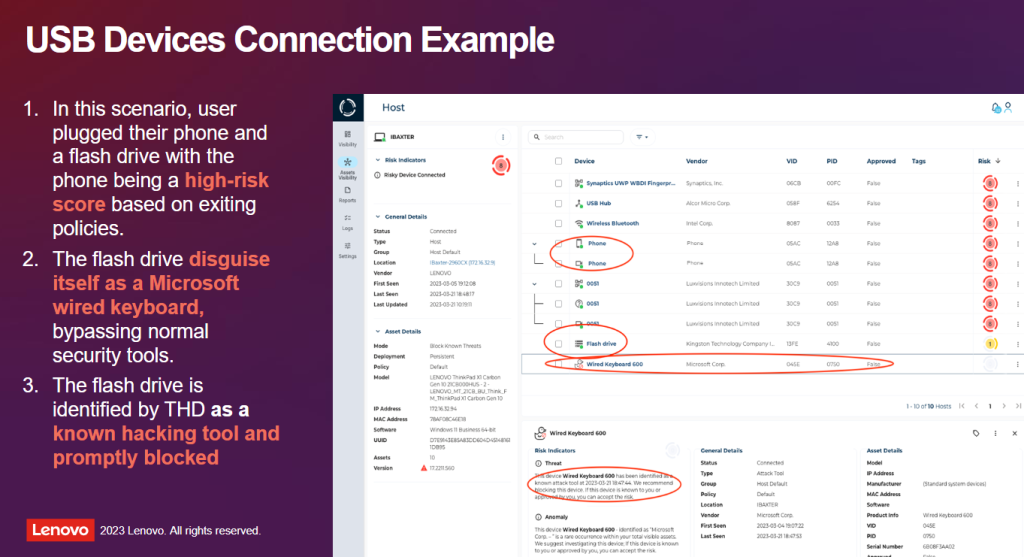
Some good news for our clients: If you are running a newer Lenovo ThinkPad laptop, you’re protected by Lenovo’s ThinkShield. This software screens connections automatically, warning you if something suspicious is trying to gain access. But ThinkShield is also available for all Windows users, regardless of the brand of laptop you’ve packed. Contact us today to install ThinkShield on your device. Whether for business or pleasure, we’re here to make sure you’re protected on your next adventure.


We’re here to help!

Get in touch today to find out why Singlesource IT should be your partner in IT.

You May Also Be Interested In:

a-computer-generated-image-of-the-letter-a

Beyond Chatbots: Preparing Your Small Business for “Agentic AI” in 2026

closeup photo of computer keyboard

The Server Refresh Deadline: Why Windows Server 2016’s End of Support Should Drive Your Cloud Migration Plan

Free attack unsecured laptop vector

The MFA Level-Up: Why SMS Codes Are No Longer Enough (and What to Use Instead)

Free cloud security database vector

The Daily Cloud Checkup: A Simple 15-Minute Routine to Prevent Misconfiguration and Data Leaks

Free cybercrime security scam vector

The “Deepfake CEO” Scam: Why Voice Cloning Is the New Business Email Compromise (BEC)

Level-Up Your Video Calls With Krisp!

Free read only readonly locked vector

Securing the ‘Third Place’ Office: Policy Guidelines for Employees Working from Coffee Shops and Coworking Spaces

Free ai generated artificial intelligence typography vector

AI’s Hidden Cost: How to Audit Your Microsoft 365 Copilot Usage to Avoid Massive Licensing Waste

Get Your Orders In Now! Hardware Prices Continue To Climb in 2026

Previous Post: «Free security pattern lock vector Complete Guide to Strong Passwords and Authentication

Next Post: Ultimate Guide to Safe Cloud Storage Free safe nature lock vector»

Primary Sidebar

Need IT?

We’ve partnered with the best. Find out why Singlesource IT should be your one source, one call technology solution.

GET IN TOUCH TODAY.

LATEST NEWS

a-computer-generated-image-of-the-letter-a

Beyond Chatbots: Preparing Your Small Business for “Agentic AI” in 2026

AI chatbots can answer questions. But now picture an AI that goes further, updating your CRM, …

closeup photo of computer keyboard

The Server Refresh Deadline: Why Windows Server 2016’s End of Support Should Drive Your Cloud Migration Plan

Time moves fast in the world of technology, and operating systems that once felt cutting-edge are …

Free attack unsecured laptop vector

The MFA Level-Up: Why SMS Codes Are No Longer Enough (and What to Use Instead)

For years, enabling Multi-Factor Authentication (MFA) has been a cornerstone of account and device …

Free cloud security database vector

The Daily Cloud Checkup: A Simple 15-Minute Routine to Prevent Misconfiguration and Data Leaks

Moving to the cloud offers incredible flexibility and speed, but it also introduces new …

Free cybercrime security scam vector

The “Deepfake CEO” Scam: Why Voice Cloning Is the New Business Email Compromise (BEC)

The phone rings, and it’s your boss. The voice is unmistakable; with the same flow and tone you’ve …

Footer

Contact Us

Singlesource IT
(614) 784-9738

148 N. High St.
Gahanna, OH 43230

Newsletter

Sign up to get free resources, tips, and news from Singlesource IT.

Thanks for signing up!

Copyright © 2026 · Singlesource IT