• HOME
  • WHAT WE DO
    • Flat Rate Managed IT Services and Support
    • Cloud Solutions
    • Technology Consulting
    • Hardware and Software
    • Phone Systems
  • ABOUT
    • Why Singlesource IT?
    • News
    • Technology Partners
  • CONTACT US
  • Search

Mobile Menu

Call us today!

(614) 784-9738

  • Menu
  • Skip to right header navigation
  • Skip to main content
  • Skip to primary sidebar
  • Skip to footer

Before Header

Call us today:  (614)784-9738

Client Login

Free Risk Report

Protected Documents

Download Your Cyber Security Guide

Singlesource IT

Your Central Ohio IT Provider. Specializing in small and mid-sized business.

  • HOME
  • WHAT WE DO
    • Flat Rate Managed IT Services and Support
    • Cloud Solutions
    • Technology Consulting
    • Hardware and Software
    • Phone Systems
  • ABOUT
    • Why Singlesource IT?
    • News
    • Technology Partners
  • CONTACT US
  • Search

Level-Up Your Video Calls With Krisp!

By now, we’ve all had virtual meetings that didn’t go as planned. Bad sound, less-than-professional workspaces, and a jumble of competing directives often have us scrambling for the “end call” button without any clarity on what was supposedly accomplished.

Krisp has the solution!
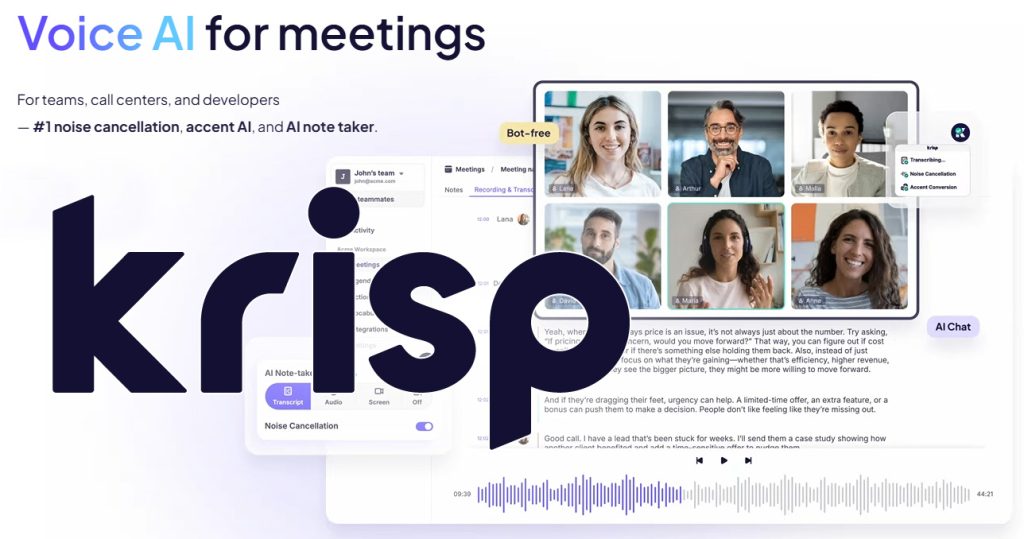
Krisp is a stand-alone AI-empowered call assistant that integrates with Zoom, Google Meet, Microsoft Teams or any other conferencing platform you may be using.

Features include Noise Cancellation, Voice Isolation, Accent Conversion, Enhanced Backgrounds, and (perhaps most importantly) a full transcription of your conversation in real time. Krisp can then take that transcript and convert it into an outline — complete with action items and next steps.

Not only will you be better understood, you’ll have an easy-to-browse record of who said what, and why.

Furthermore, Krisp respects your privacy. Your sensitive call records and data are yours and yours alone, owned by you and not available to any third parties.  

Whether you’re running a meeting from HQ or logging in from a remote coffee shop, Krisp is the video-call assistant you need. It’s like having an AV team, a stenographer, and a secretary all in one.

The best part? With our referral code, you can sign up for free.

Don’t wait. Click here to sound and look your best with Krisp today!

We’re here to help!

Get in touch today to find out why Singlesource IT should be your partner in IT.

You May Also Be Interested In:

lady holding phone while working on a laptop

Should Employees Use Personal Devices for Work?

people working on computer

Why Your Employees Shouldn’t Have Administrator Access to Their Computers

magnifying glass near gray laptop computer

The 30-Minute IT Check Every Small Business Should Do Once a Month

Free windows logo window illustration

How to Keep Your Business Running When Microsoft 365 Goes Down

Free Cloud Network photo and picture

OneDrive or SharePoint? Where Your Business Files Should Live

Free web design user interface website illustration

Is Your Business Website a Security Risk?

Why You Should Scroll Past the First Result on Google

Free scam phishing fraud illustration

How to Spot a Scam Email Now That They Look Real

hacker typing on a laptop lego style

What to Do in Case of a Cyberattack (Step by Step)

Previous Post: «Free read only readonly locked vector Securing the ‘Third Place’ Office: Policy Guidelines for Employees Working from Coffee Shops and Coworking Spaces

Next Post: The “Deepfake CEO” Scam: Why Voice Cloning Is the New Business Email Compromise (BEC) Free cybercrime security scam vector»

Primary Sidebar

Need IT?

We’ve partnered with the best. Find out why Singlesource IT should be your one source, one call technology solution.

GET IN TOUCH TODAY.

LATEST NEWS

lady holding phone while working on a laptop

Should Employees Use Personal Devices for Work?

Summary: Allow personal devices only for approved work, through approved apps, and when the device …

people working on computer

Why Your Employees Shouldn’t Have Administrator Access to Their Computers

Summary: Employees should use standard accounts for email, web browsing, and everyday work. …

magnifying glass near gray laptop computer

The 30-Minute IT Check Every Small Business Should Do Once a Month

Summary: Most IT problems don't appear out of nowhere. Backups quietly stop running, updates sit …

Free windows logo window illustration

How to Keep Your Business Running When Microsoft 365 Goes Down

Summary: The tools that run your business, like Microsoft 365, your accounting app, or your booking …

Free Cloud Network photo and picture

OneDrive or SharePoint? Where Your Business Files Should Live

Summary: If your business uses Microsoft 365, you have both OneDrive and SharePoint, and files …

Footer

Contact Us

Singlesource IT
(614) 784-9738

148 N. High St.
Gahanna, OH 43230

Newsletter

Sign up to get free resources, tips, and news from Singlesource IT.

Thanks for signing up!

Copyright © 2026 · Singlesource IT