• HOME
  • WHAT WE DO
    • Flat Rate Managed IT Services and Support
    • Cloud Solutions
    • Technology Consulting
    • Hardware and Software
    • Phone Systems
  • ABOUT
    • Why Singlesource IT?
    • News
    • Technology Partners
  • CONTACT US
  • Search

Mobile Menu

Call us today!

(614) 784-9738

  • Menu
  • Skip to right header navigation
  • Skip to main content
  • Skip to primary sidebar
  • Skip to footer

Before Header

Call us today:  (614)784-9738

Client Login

Free Risk Report

Protected Documents

Download Your Cyber Security Guide

Singlesource IT

Your Central Ohio IT Provider. Specializing in small and mid-sized business.

  • HOME
  • WHAT WE DO
    • Flat Rate Managed IT Services and Support
    • Cloud Solutions
    • Technology Consulting
    • Hardware and Software
    • Phone Systems
  • ABOUT
    • Why Singlesource IT?
    • News
    • Technology Partners
  • CONTACT US
  • Search

Server Failure Frequency Vs. Age: The Stats Are In!

Failure rates. When it comes to what’s happening behind the server closet door, usually “no news is good news”. As long as there’s a peaceful hum and a little heat coming out of there, we move on, feeling good for another day.

But as the graph below shows, no server lasts forever.
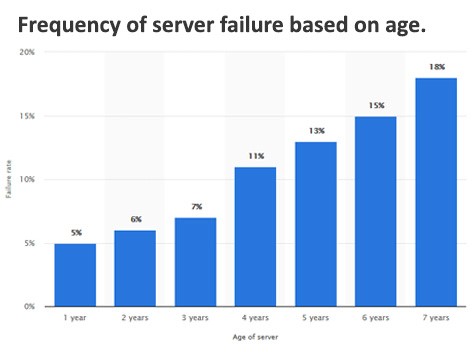
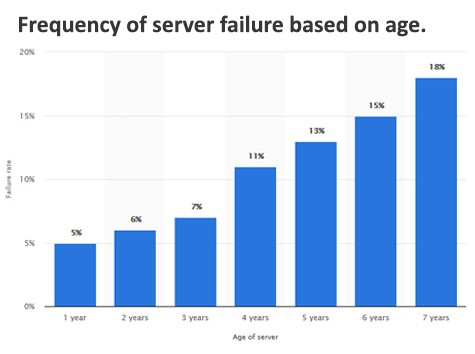
During the first year, servers are shown to have a failure rate of 5%. While this might seem high, it’s often the result of some out-of-the-box defect or initial configuration issue, easily diagnosed and fixed. Over the next two years, rates only rise at a level of 1%, showing a period of stability. Hard drive failures start to spike around year four, pushing our number up to 11%. After that, the curve increases until it becomes clear that a server replacement is not just of question of if, but when.
A similar graph shows Server Downtime by age. Reflecting the failure rates above, this graph shows that downtime is relatively flat for the first few years – downtime that might be attributed to planned re-boots and software updates. After that the curve shows a sharp and steady increase indicating unplanned incidents and additional resources spent on IT personnel to address emergency problems.

In other words, a planned investment in hardware now might save you money (and headaches) down the road.
Even if you’re not running a server, the same sort of failure curve applies to Laptops, Workstations, Tablets, and other digital devices. Think ahead, backup, and have a life-cycle replacement plan in place. If you need a second opinion, give us a call. We’re ready to review your network, make recommendations, and guarantee that you’re ready for business.

(Graphs and more information can be found here.)

We’re here to help!

Get in touch today to find out why Singlesource IT should be your partner in IT.

You May Also Be Interested In:

Free antivirus security privacy illustration

LinkedIn “Social Engineering”: Protecting Your Staff from Fake Recruitment Scams

Free cyber security digital cyber illustration

“Clean Desk” 2.0: Securing Your Home Office from Physical Data Leaks

Free list notes icon illustration

The Essential Checklist for Securing Company Laptops at Home

Free cloud computer backup illustration

The 2026 Guide to Uncovering Unsanctioned Cloud Apps

A combination lock rests on a computer keyboard.

Stop Ransomware in Its Tracks: A 5-Step Proactive Defense Plan

Old Router Around the House? The NSA & The FBI Agree: Reboot or Replace Now!

A piece of cardboard with a keyboard appearing through it

How to Run a “Shadow AI” Audit Without Slowing Down Your Team

Free cyber security technology network illustration

A Small Business Roadmap for Implementing Zero-Trust Architecture

Download free HD stock image of Technology Light

5 Security Layers Your MSP Is Likely Missing (and How to Add Them)

Previous Post: «Windows 11 Coming Soon Microsoft Announces Windows 11
Next Post: Office 365 User? Make Sure You’ve Updated by November 1st! »

Primary Sidebar

Need IT?

We’ve partnered with the best. Find out why Singlesource IT should be your one source, one call technology solution.

GET IN TOUCH TODAY.

LATEST NEWS

Free antivirus security privacy illustration

LinkedIn “Social Engineering”: Protecting Your Staff from Fake Recruitment Scams

A fake recruiter message is one of the cleanest social engineering tricks around because it doesn’t …

Free cyber security digital cyber illustration

“Clean Desk” 2.0: Securing Your Home Office from Physical Data Leaks

In the traditional office, a “Clean Desk” policy was a simple habit: shred the sensitive stuff, lock …

Free list notes icon illustration

The Essential Checklist for Securing Company Laptops at Home

At home, security incidents don’t look like dramatic movie hacks. They look like stepping away from …

Free cloud computer backup illustration

The 2026 Guide to Uncovering Unsanctioned Cloud Apps

If you want to uncover unsanctioned cloud apps, don’t begin with a policy. Start with your browser …

A combination lock rests on a computer keyboard.

Stop Ransomware in Its Tracks: A 5-Step Proactive Defense Plan

Ransomware isn’t a jump scare. It’s a slow build.In many cases, it begins days, or even weeks, …

Footer

Contact Us

Singlesource IT
(614) 784-9738

148 N. High St.
Gahanna, OH 43230

Newsletter

Sign up to get free resources, tips, and news from Singlesource IT.

Thanks for signing up!

Copyright © 2026 · Singlesource IT